

Platform
Sound familiar? Training admin is growing faster than your team.
Requests in inboxes. Dates in spreadsheets. Trainers in chat threads. Participants in separate files. Reporting turns into a treasure hunt.
What improves?
Plan and manage training in one platform
A customer changes the date, a trainer already holds a provisional booking, and HR asks who has enrolled. Without a shared status, one change becomes a chain of messages. Training involves several roles: from the original request and scheduling through communications, attendance, assessment and reporting. Handoffs are often where delays, missing information and repeated admin arise.
A connected workflow
A customer changes the date, a trainer already holds a provisional booking, and HR asks who has enrolled. Without a shared status, one change becomes a chain of messages.
A practical next step
Start with one shared training record, clear responsibilities and agreed moments for updating information. Then identify recurring activities that could be supported or automated.
The same details are stored in five places.
We discover gaps only when it is too late.
Train365 / smarter operations
From fragmented tasks to one training journey.
Connect enquiries, scheduling, trainers, client communication, assessments and completion. Start with the processes that consume the most time and expand as you grow.
Explore features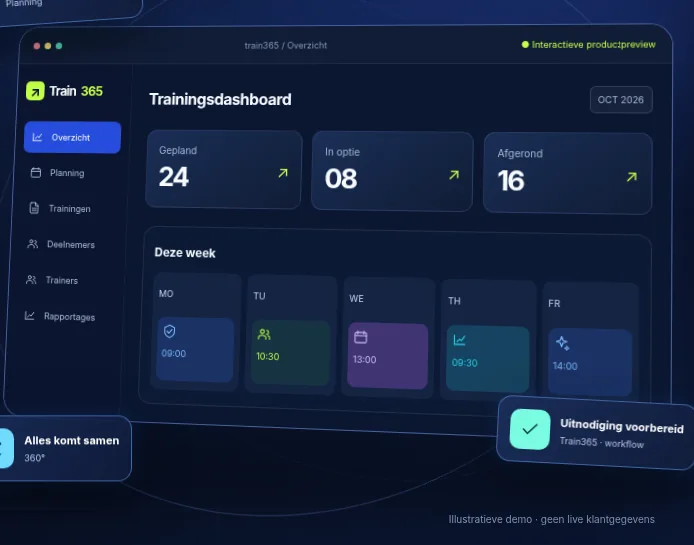
INTERACTIVE PRODUCT DEMO
One training workflow. Three connected portals.
Follow a fictional training course from request to insight. Switch roles to see what each user needs at each step.
Internal operations
Training dashboard
Review requests, available trainers and training statuses in one place
Training24↗
Scheduled16↗
Options08↗
Active trainingNew request
Microsoft 365 Copilot – Practical workshop
- Client
- Northstar Digital Ltd
- Trainer
- Sanne de Vries
- Date
- 12 November 2026
- Group
- 8 participants
Activity timeline
✓Review training request
·Compare available dates
·Confirm trainer
·Invite participants
·Prepare evaluation
Progress1 / 5
New request
A client requests a Microsoft 365 workshop for eight employees.
Tip: use the arrow keys to move through steps.
Interactive simulation · fictional information only · no live customer data
HOW IT WORKS
From training request to measurable outcomes.
Turn requests into schedules, schedules into training, and completed sessions into actionable results, with everyone kept in the loop.
Request
Capture course, customer, participant and preferred date information.
Schedule
Match trainers, dates, locations and optional sessions, including groups and half-days.
Organise
Assign participants, manage communication and prepare delivery.
Deliver
Record attendance and collaborate across trainer and client portals.
Complete
Process evaluations, assessments, certificates and reports.
FROM REQUEST TO IMPACT
One flow. From first request to lasting results.
Train365 brings people, sessions and information together with fewer handoffs.
01 / 05
Request
Capture training needs and participants without scattered email threads.
ONE CONNECTED PROCESS
From scattered lists to one training workflow
Less handover work, clearer ownership and a shared overview.
Start with a request
Capture the course, client, participants, location and preferred dates once.
Make scheduling visible
Review trainer availability, provisional dates and confirmed arrangements.
Close the loop
Bring attendance, feedback, certificates and reporting together.
Illustrative workflow. Feature availability depends on implementation.
Explore all featuresTRAIN365 / ONE WORKFLOW
A connected training workflow
From the first request to visibility for clients and trainers.
Requests & CRM
Take each request from enquiry to a clear customer record.
Training scheduling
Manage confirmed dates, options and groups clearly.
Reporting & analytics
See scheduling, participation and training quality.
Train365 · scale
Scalable without replacing everything on day one
One team, several sites or a training provider network? Roles, client portals and tenant structures can grow with your setup, subject to licensed modules.
01 · Features02 · Industries03 · Integrations04 · Pricing
Train365 · scenario
What might your organisation save?
Adjustable scenario, not measured performance, a guarantee or a customer testimonial.
Potential admin hours saved per month–
TRAIN365 / DISCOVER
How Train365 fits your way of working.
How it worksTraining involves more than adding a date to a calendar. Train365 connects the journey so every role can access the right information at the right time.PortalsPlanners, trainers, clients and learners have different needs. Train365 brings their work together while respecting roles and access permissions.AutomationReduce recurring administrative work with notifications and controlled workflows. Keep human approval where it matters.SecurityTrain365 is designed around tenant isolation, permissions and auditable actions. Operational security must still be demonstrated in a real hosting environment.Integration HubThe Integration Hub provides a catalogue for module requests, connector allowances, approvals and synchronisation status. Listed integrations are not necessarily active.RoadmapTrain365 evolves in response to practical needs. This roadmap shows intended priorities, not confirmed release dates or promised functionality.ImplementationA good rollout starts with understanding your existing training process, roles, data, integrations and a safe pilot.Impact & ROIMeasure administrative steps, handovers and lead times before and after process improvements.FAQQuestions about rollout, subscriptions, integration readiness, data and access? Start here.
TRAINING MANAGEMENT SOFTWARE
One training workflow. Clear next steps for everyone.
Training requests, trainers, participants and client commitments are closely linked. Train365 brings them together, from scheduling through completion.
Coordinate scheduling
Keep provisional dates, availability and locations visible.
Give every role clarity
Let planners, trainers and clients work through dedicated portals.
Complete with evidence
Connect attendance, assessments, feedback and reporting.
Feature and integration availability is subject to release acceptance; source release 0.6.2 is staging.
Discuss your process →Plan and manage training in one platform
A customer changes the date, a trainer already holds a provisional booking, and HR asks who has enrolled. Without a shared status, one change becomes a chain of messages. Training involves several roles: from the original request and scheduling through communications, attendance, assessment and reporting. Handoffs are often where delays, missing information and repeated admin arise.
training management software
A customer changes the date, a trainer already holds a provisional booking, and HR asks who has enrolled. Without a shared status, one change becomes a chain of messages.
Discuss your workflow
Start with one shared training record, clear responsibilities and agreed moments for updating information. Then identify recurring activities that could be supported or automated.
Learn more about this approach
A customer changes the date, a trainer already holds a provisional booking, and HR asks who has enrolled. Without a shared status, one change becomes a chain of messages.
Start with one shared training record, clear responsibilities and agreed moments for updating information. Then identify recurring activities that could be supported or automated.
Train365
What could your team achieve with less admin?
Show us your current workflow. We will listen and demonstrate relevant possibilities, without pressure.
Book a demo